Every fact on this page applies to update 1.0.0, the one version tested. Other versions may behave differently.
No emulator needed: Princess Peach: Showtime! runs natively on the Apple chip. How nxnative compares with emulators
Running through nxnative
How Princess Peach: Showtime! runs
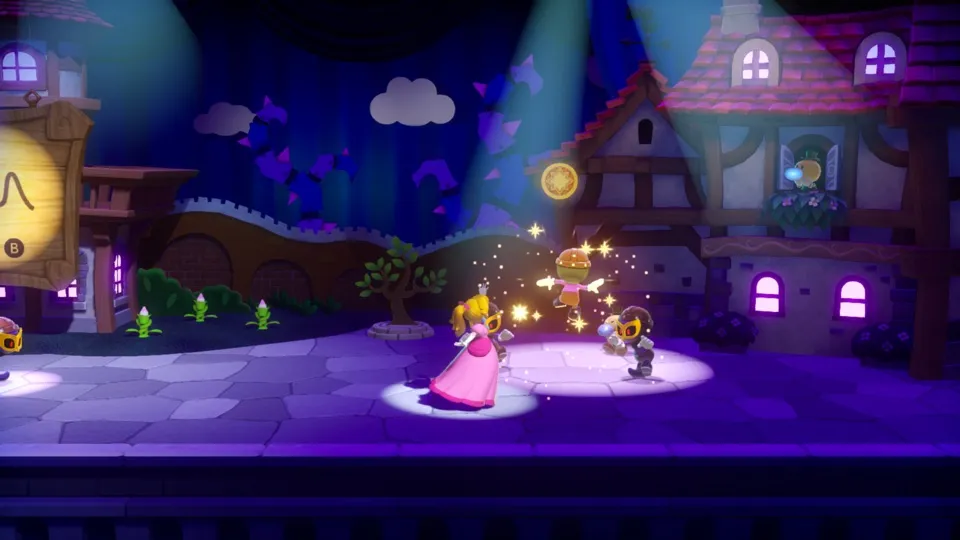
Princess Peach: Showtime! plays on the Mac at 60 fps instead of the 30 fps it asks for, with the game still running at its normal speed. It has been tested from a new game through the whole first play. No iPhone or iPad app has been built yet.
How it runs
On the Mac, a new game went through the opening movie, the title, the lobby, the ticket event, the opening cutscene and the whole first swordfighter play: ribbon fights, the forest's three spotlight plants, the first Sparkle Gem, the castle, the transformation and the sword fights. It then returned to the lobby with one Sparkle Gem and saved. That save loads, and the first set of the ninja play runs without a crash.
The lobby, the cutscenes and the first play hold 60 fps on an Apple M6 Mac. For about a second where a scene starts, some frames still take 40 to 120 ms. The game's speed follows real time, so walking and dialogue behave the same at 60 fps as at 30.
Over 25 minutes, memory peaked at about 6.1 GB during the transformation, with 3.1 GB of graphics memory; it was about 3.6 GB in the lobby and about 5 GB in the play.
Version
Tested with the base game, version 1.0.0, with no update. It runs at 60 fps on that version.
Controls
The Packed app starts in the 2D touch layout.
- A skips the opening movie, and A again passes the title.
- In the lobby, A next to someone talks to them. When a line of dialogue keeps repeating while Peach stands next to its speaker, B closes it.
- In the play, B spins the ribbon, the stick with B throws it, and A jumps.
Good to know
- The first Pack for the Mac builds the game's shaders, which took about 2 hours 45 minutes on an Apple M6, plus 10 minutes more to prepare them.
- In a new game the stairs and doors of the lobby stay closed until you have talked to three people: the usher in the red vest at the door with the sword sign, the Theet at the cowgirl poster on the right and the Theet at the foot of the stairs. Then Toad, waiting at the south end of the central bowl, takes your ticket.
- The forest's exit in the first play opens once all three plants are spun open; the two on the side platforms are reached from the back row.
- Other plays beyond the first set of the ninja play, with their costumes and stages, are untested.
Known issues
- No iPhone or iPad app has been built or tested yet. Memory use on the Mac peaked at about 6.1 GB, which is high for an iPhone.
- Only the first play has been finished; of the others, only the first set of the ninja play has been seen.
- Sound has not been listened to, and every test ran without a game window.
Packing command
Run this in your nxnative folder on the Build Mac. Replace the game folder and the keys path with your own. Add --platform mac-app to get a Mac app instead of an iPhone and iPad app.
python3 scripts/build_ipa_from_nsp.py ~/Games/princess-peach-showtime -k ~/keys/prod.keysPut update 1.0.0 in the game folder to get 60 fps.
FAQ
Does Princess Peach: Showtime! work with nxnative?
Yes. Princess Peach: Showtime! is tested with nxnative on update 1.0.0. With update 1.0.0 it runs at 60 fps.
Which iPhone, iPad or Mac do I need to play Princess Peach: Showtime!?
An iPhone 15 Pro or newer (A17 Pro chip or later) or an iPad with an M1 chip or later, on iOS or iPadOS 26 or later, or a Mac with Apple silicon. iPads with the A17 Pro chip (iPad mini) have the iPhone 15 Pro's chip but are untested by nxnative. Packing needs a Mac with macOS 26.6 or later and Xcode 27.2.
Is Princess Peach: Showtime! included?
No. Neither this site nor nxnative includes any game. You Pack Princess Peach: Showtime! from your own copy of the game, with keys dumped from your own Switch.
Does online play work in Princess Peach: Showtime!?
Online play in Princess Peach: Showtime! is not confirmed to work, so do not count on it.