Every fact on this page applies to update v131072, the one version tested. Other versions may behave differently.
No emulator needed: Fire Emblem Fortune's Weave runs natively on the Apple chip. How nxnative compares with emulators
Running through nxnative
How Fire Emblem Fortune's Weave runs
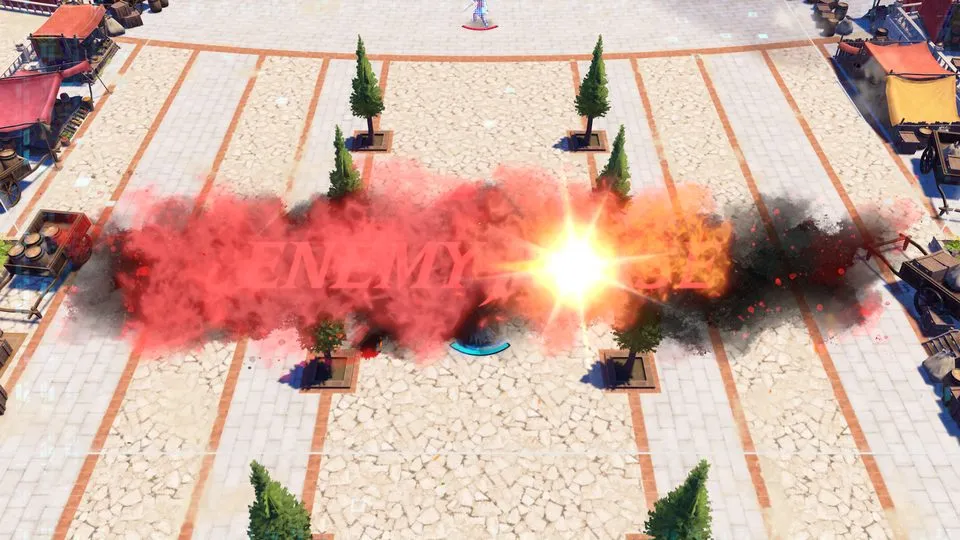
Fire Emblem Fortune's Weave plays on the Mac at 60 fps, up from the 30 fps its gameplay runs at on the Switch 2, and up to 120 fps on a screen that shows 120 Hz. Tested through the opening movie, the dialogue and the first battle map, whose first turn matches published footage, and its battle scenes in a playtest. No iPhone or iPad app has been built yet.
How it runs
The Packed app raises gameplay from 30 to 60 fps; the title and menus already run at 60. On an M4 Pro Mac the battle map holds 60 fps in a window, with about 2 frames in 300 dropped.
On the Mac, the Frame rate setting also offers 120 fps. The project developers checked the speed at 120 against 60 with the same timed cursor moves on a battle map, and they stopped at the same place every time; a difference of a few percent would not show. The tester who played at 120 saw the speed as right. On the battle map the game ran at 107 to 119 fps without a window; in a window, most of a playtest held 106 to 117 fps, with slower stretches where the GPU was busier. When 120 does not fit, frames step at 60 and the game keeps its speed. Version v131072 is the only one tested at 120.
The checkered look of an enemy and the pale squares over the ground are in published footage of the game too, so they are not nxnative's doing.
Bring update v131072
Tested with version v131072, the only version tried. It was packed from a folder of the game's files.
Controls
The Packed app starts in the 3D touch layout, because the game asks for most of the controller at once.
On the Mac keyboard in a window, J, K, U and I are A, B, X and Y, WASD is the left stick, Shift with the arrow keys is the right stick, Z is ZL (threat range) and C is ZR (settings). Pressing A from the start goes through the movie and the dialogue to the first battle map in about 80 seconds.
Good to know
- To keep the game at its original 30 fps, choose 30 in the Frame rate setting; the menus then run at 30 too.
- The game's 82 movies are AV1. A Mac from before M3 has no hardware AV1 decoder and decodes them in software.
Known issues
- Nothing past the first battle map has been played.
- No iPhone or iPad app has been built yet; the game's memory layout is over iOS's limit for now.
- At 120 fps, the In and Out animation of a results list's menu items runs at double speed. It only affects looks.
- Game speed at 60 fps has not been measured against the original 30 fps over the same route, though battles played at 60 fps did not look fast.
Packing command
Run this in your nxnative folder on the Build Mac. Replace the game path with your .nup file or the folder of the game's files. It builds a Mac app, the only kind tested so far; leave out --platform mac-app for an iPhone and iPad app, which is untested.
python3 scripts/build_ipa_from_nsp.py ~/Games/fire-emblem-fortunes-weave --platform mac-appFAQ
Does Fire Emblem Fortune's Weave work with nxnative?
Yes. Fire Emblem Fortune's Weave is tested with nxnative on update v131072. On a Mac it runs at up to 120 fps on a screen that shows 120 Hz, with no particular update needed.
Which iPhone, iPad or Mac do I need to play Fire Emblem Fortune's Weave?
Fire Emblem Fortune's Weave is a Nintendo Switch 2 Game. So far it has been tested on the Mac only, which needs Apple silicon; an iPhone and iPad app can be packed but is untested. Packing needs a Mac with macOS 26.6 or later and Xcode 27.2.
Is Fire Emblem Fortune's Weave included?
No. Neither this site nor nxnative includes any game. You Pack Fire Emblem Fortune's Weave from your own copy of the game.
Does online play work in Fire Emblem Fortune's Weave?
Online play in Fire Emblem Fortune's Weave is not confirmed to work, so do not count on it.