Every fact on this page applies to update 1.8d.310c, the one version tested. Other versions may behave differently.
No emulator needed: EA SPORTS FC 27 runs natively on the Apple chip. How nxnative compares with emulators
Running through nxnative
How EA SPORTS FC 27 runs
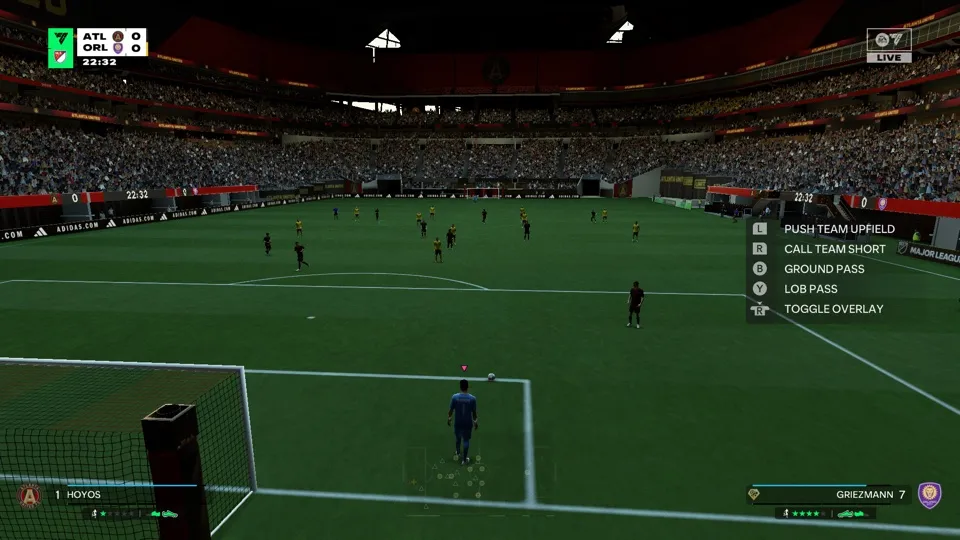
EA SPORTS FC 27 plays on the Mac at 60 fps with update 1.8d.310c, up from the 30 fps it has on the Switch, and the match clock still runs at its normal speed. Tested through the first-start setup (accessibility settings, the offline notice, the user agreement and a favourite team), the main menu and a Classic Match, Atlanta United against Orlando City: the pre-match presentation, kick-off and the first half into the second, to the 67th minute, with passing, shooting, a goal, a corner and the tactics tutorial. No iPhone app has been built yet.
How it runs
nxnative raises both the game's simulation rate and its frame limiter to 60, so menus and matches run at 60 fps at the right speed. Raising only the frame rate made the match clock run at half speed, so the two go together.
The game reserves large blocks of memory space as it plays. On the Mac about 3.5 GB of memory was in use. The space it reserves is larger than has been shown to work in an iPhone app, so whether it can run on an iPhone is still open.
The game cannot reach EA's servers, so it shows an offline notice at the title and plays offline.
Bring update 1.8d.310c
The 60 fps settings are made for update 1.8d.310c. Put it in the same folder as the base game before you Pack. Another update runs at 30 fps, at the right speed, until the project developers carry the settings over to it.
Controls
The Packed app starts in the 2D touch layout. In a match the left stick moves, A passes and B shoots.
Good to know
- A whole match, its result screens, Career, the offline parts of Ultimate Team, Tournaments, other stadiums and weather, local multiplayer and other languages have not been tested.
- The game asks for the accessibility settings on every start.
Known issues
- No iPhone app has been built or tested. The game reserves more memory space than has been shown to work on an iPhone.
- Only one Classic Match, up to the 67th minute, has been played; other modes are untested.
- Online play needs EA's servers, so the game plays offline.
- The game asks for the accessibility settings on every start.
Packing command
Run this in your nxnative folder on the Build Mac. Replace the game folder and the keys path with your own. Add --platform mac-app to get a Mac app instead of an iPhone and iPad app.
python3 scripts/build_ipa_from_nsp.py ~/Games/ea-sports-fc-27 -k ~/keys/prod.keysPut update 1.8d.310c in the game folder to get 60 fps.
FAQ
Does EA SPORTS FC 27 work with nxnative?
Yes. EA SPORTS FC 27 is tested with nxnative on update 1.8d.310c. With update 1.8d.310c it runs at 60 fps.
Which iPhone, iPad or Mac do I need to play EA SPORTS FC 27?
An iPhone 15 Pro or newer (A17 Pro chip or later) or an iPad with an M1 chip or later, on iOS or iPadOS 26 or later, or a Mac with Apple silicon. iPads with the A17 Pro chip (iPad mini) have the iPhone 15 Pro's chip but are untested by nxnative. Packing needs a Mac with macOS 26.6 or later and Xcode 27.1.
Is EA SPORTS FC 27 included?
No. Neither this site nor nxnative includes any game. You Pack EA SPORTS FC 27 from your own copy of the game, with keys dumped from your own Switch.
Does online play work in EA SPORTS FC 27?
Online play in EA SPORTS FC 27 is not confirmed to work, so do not count on it.